
Howdy!
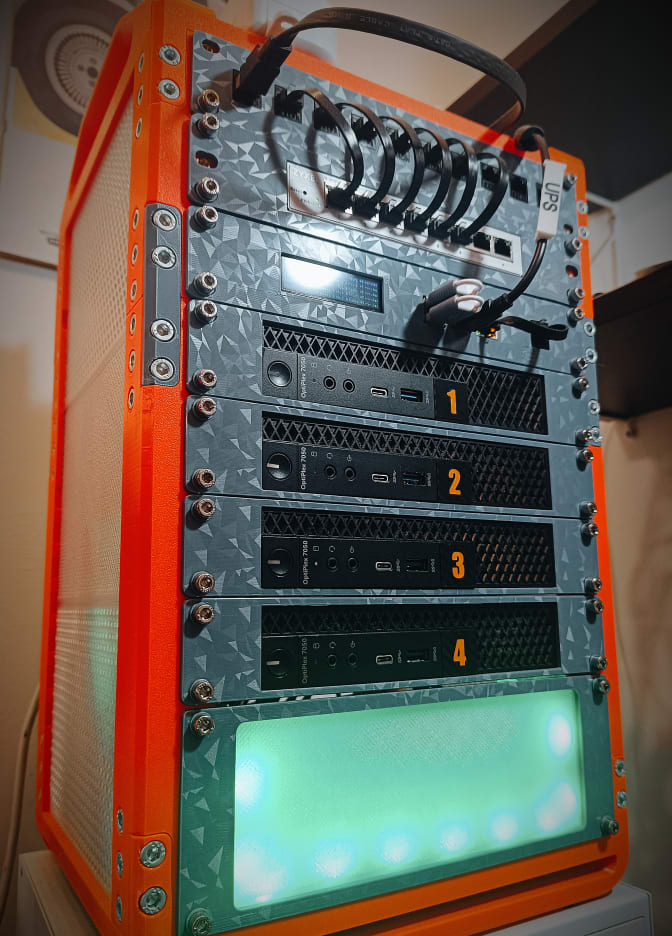
So my wife is thrilled about the rack I printed. Orange and grey, 10 inches wide, nine units tall, heavy duty. A unit, for the uninitiated, is the standard slice of rack height, about 4.4 centimeters of it. Nine units is roughly 40 centimeters of vertical ambition for what she believes is one little box. She picked the color, actually, because she loves orange, and when I told her I needed a proper rack for “the blinking lights box” she just went “obviously you do.” No pushback. No questions. Genuine enthusiasm, even.
I want to be clear about something before I go any further: I did not lie to her. Everything I told her about this rack is true. It is orange. It is heavy duty. I do, in fact, need it.
What I did not mention is what all those units were for.
The part she doesn’t track
To my wife, the whole homelab is one unit: a handful of blinking lights that let her watch Jellyfin and keep the smart home from plunging us into darkness. She doesn’t distinguish between node one and node four any more than you’d distinguish between the second and third brick in a wall. It’s just “the computers.” So when the computers quietly went from two to four, nothing about her mental model actually changed. Still blinking lights. Still Jellyfin. Still fine.
Which is convenient, because I have a bit of a track record here. And to be fair, so does the marriage. We picked April 1st as our wedding date, on purpose, fully aware of what that looks like, so nobody gets to act shocked when this whole thing runs like a bit that got out of hand. Last time I brought home a second OptiPlex 7050 Micro, it took her four weeks to notice. Four weeks. That’s not luck, that’s a baseline. And this time, with two more of the exact same tiny, unremarkable, nothing-to-see-here form factor sliding onto a shelf she already can’t be bothered to fully inventory, I intend to beat it.
The rack was never the risk. The rack is orange, approved, and sitting in the open. I even added WLED strips to it. Addressable LEDs. On the covert infrastructure. Because apparently the part of my brain in charge of operational security and the part in charge of “ooh, animations” are not on speaking terms, and the second one has admin rights. She saw the lights, by the way. She liked them. The camouflage is now actively drawing attention to itself and it is somehow still working, because to her, more blinking lights on the blinking lights box is just the box being extra itself.
The Greeks had to build their horse in secret and pray the Trojans would drag it inside the walls on their own. My Troy approved the horse in advance, picked its color, and complimented the lighting. Some sieges just run themselves.
Less Than Two Kilos of Horse
The horse itself is the KWS Rack v2, a heavy-duty 10-inch design that deserves every bit of credit for how boring this section is about to be. Under two kilograms of PETG, spread over a couple of days of non-continuous printing. The screws cost more than the plastic. Printing went smooth. Assembly went smooth. I kept waiting for the part of the project where I ruin everything and get a blog section out of it, and it never came. Honestly, a little disappointing. I had material ready.
Why Four, Though
Here’s the part I haven’t had to explain to anyone yet, so let me explain it to you instead.
Two OptiPlex 7050 Micros was a homelab. Four is a proper Proxmox cluster: workloads can migrate between nodes, a dead machine stops being an emergency and starts being an inconvenience, and I finally stopped running “one node holds everything and prays” as an architecture. Lose a node, and what was running on it comes back up on another one. It’s the difference between a single load-bearing wall and a building that can shrug off losing one.
Except four nodes comes with a trap that two never warned me about. Cluster decisions work by majority vote, and four is an even number. Split 2 against 2, say because a switch hiccups and half the cluster stops seeing the other half, and nobody has a majority. The cluster doesn’t fight. It freezes, politely, like a committee that tied on where to order lunch and resolved to starve.
The fix is a tiebreaker, and mine is a Raspberry Pi running as a QDevice. It runs no VMs. It stores no data. It has exactly one job: when the vote ties, the Pi votes. The smallest, cheapest board in the rack is also the only member of the cluster whose opinion can’t be deadlocked. It reminds me of stories I heard in Kenya, where the oldest man in the village doesn’t plant, doesn’t build, doesn’t carry anything. He sits, he listens, and when the arguing is done, his word settles it. The Pi is my elder. It does no work. Its vote is final.
So if you’re going from two nodes to four, or any even number to any even number: budget for the tiebreaker. It costs less than the screws of your rack.
And then there’s the part that actually matters, which is the part nobody screenshots: what happens when a node dies for real, not in a nice controlled “let’s test failover” way but in a “the PSU just let the magic smoke out at 2am while I’m asleep and mid-dreaming about being chased by my own Beszel alerts” way.
Enter Proxmox Backup Server
That’s where PBS earns its spot in the rack.
I’ve been running backups the way most people run backups, which is to say: sporadically, guiltily, and with a strong “I’ll deal with it if it happens” energy that is not actually a strategy. PBS is the fix, not a folder full of exports I periodically remember, but scheduled, deduplicated, incremental backups running against every VM and container in the cluster, with actual retention policies instead of vibes. Every guest gets covered except one: PBS doesn’t back up itself. We’ll get to why that’s a feature.
Dedup matters more than I expected going in. Four nodes running broadly similar guests means a lot of overlapping blocks, and PBS only stores the new ones. Turns out backing up four machines doesn’t cost four times the space when they’re all running variations on the same handful of templates.
Where to put the safety net
Before a single backup job existed, there was a decision I nearly fumbled three different ways: where PBS should physically live. The rule that settled it is worth stealing even if you never touch Proxmox in your life. Your backup target must not share a failure domain with the thing it protects. A backup that dies in the same incident as the original is not a backup. It’s a second copy of the problem.
With that rule in hand, the options sorted themselves out:
- Bare metal on a dedicated node. Cleanest separation on paper, but it burns an entire OptiPlex on a service that sits idle outside backup windows, and these machines are not exactly swimming in spare compute. Rejected.
- A USB disk hanging off a cluster node. One unredundant disk, on a controller famous for dropping out under exactly the kind of sustained writes backups are made of, physically attached to the thing it is supposed to survive. That is not a safety net. That is decoration. Rejected.
- The NAS’s Proxmox host. A different physical box from the cluster, mirrored ZFS vdevs underneath, zero cluster compute wasted. Winner.
Then ZFS raised its hand with a complication. My pool is not owned by the Proxmox host, it is owned by an OMV VM running on it. The host sees disks, not a filesystem, so nothing on the host can point at “local ZFS”, because locally there is no ZFS to point at. And before you ask: no, you cannot just import the pool on the host as well. ZFS assumes single ownership, and importing the same pool from two places is not a clever workaround, it is a speedrun to corruption. Think of it like two microservices writing to the same database table with no locking, except the table is every photo you own.
So the final shape is PBS running as an LXC on the NAS host, consuming an NFS export from OMV. Yes, that puts a network filesystem in the loop, which purists will frown at. But both guests sit on the same physical box, so the traffic crosses an internal virtual bridge and never touches the LAN, and architecture is mostly the art of picking the compromise you can live with. It also explains the one guest PBS doesn’t cover: itself. That sounds like a gap until you notice it’s the point. The safety net lives on a different box, on redundant storage, precisely so it never attends the funerals it covers. Past Marco would have plugged in the USB disk and moved on with his life. Present Marco has read past Marco’s incident reports.
Anticlimax as a service
After all that architectural agonizing, the setup itself took one quiet evening:
- One dedicated datastore
- A GC schedule so old chunks actually get reclaimed instead of quietly filling the disk
- A retention policy that’s less “keep everything forever” and more “keep enough that I can actually get back to a sane point”: 7 daily, 4 weekly, 6 monthly
- Prune jobs on their own schedule, so they’re not fighting the backup jobs for I/O. Nobody warns you about this one until you watch a backup crawl because a prune decided it was also 2am somewhere
And the one thing I’d underline if you only remember one thing from this post: schedule a test restore, not just a backup. A backup you’ve never restored from isn’t a backup, it’s a hope. I picked one low-stakes container, spun up a restore on a completely different node from the one it originally lived on, and just watched it come back. Ten minutes, once. Now I actually believe the safety net exists instead of just trusting the green checkmark next to “backup completed.”
The honest pitch for PBS isn’t “now I have backups,” because I sort of already had backups, in the same way everyone “sort of” has backups. The pitch is that restoring stops being a research project. A node goes down, I’m not reconstructing state from three different places and my own memory of what I changed last Tuesday. I’m pointing PBS at a snapshot and waiting.
Which, incidentally, is also the plan for the day my wife finally notices node three and node four. Restore my credibility from the last known good snapshot. Retention policy: indefinite.
Happy building ⚒